


The phone stops ringing, the Maps pin disappears, and the dashboard flashes suspended. For a UK owner, that can mean a trades week goes quiet, a storage enquiry window closes, or a hospitality line goes dead just when nearby searches spike. The first reaction is usually panic, but Google has already turned the problem into a process, not a mystery, and the right move is to work that process carefully.
Google states that a Business Profile suspension removes the listing from Google Search and Google Maps, then routes the owner into a formal appeals flow with a decision sent by email. In the UK help flow, if supporting files are added through the evidence form, they must be uploaded within 60 minutes or they won't attach, and Google says appeals are typically reviewed in about 3 to 7 business days, though that isn't guaranteed (Google's suspension guidance). That structure matters because it changes the job from “fix everything fast” to “submit the right case once.”
For UK operators, the quickest way to steady the situation is to treat the profile like an identity record, not a marketing page. A useful starting point is a clean review of the public listing and the account behind it, and a practical tool for that is Bragly's Google Business Profile audit for reviews, which can help surface profile inconsistencies before the appeal is filed. That kind of check is especially valuable when the listing vanished during a busy call-driven stretch, because time spent guessing is time spent off Maps.
The Moment Your Listing Disappears From Google Maps
A UK business owner usually spots the problem in one of three ways. A customer says they could not find the listing. A branded search returns competitors but not the business. Or the dashboard shows a red suspended banner that makes the situation impossible to ignore.
Panic is normal, but the fix is procedural
The first minute feels bigger than a listing issue. The business may still be open, staff may still be on site, and the phone may still work, yet the local discovery layer is gone. Google's help pages frame this as an enforcement state with a reinstatement route, not a permanent loss of the profile (Google's suspension guidance).
That distinction matters in the UK because many businesses depend on same-day calls. Self-storage centres, plumbers, estate agents, hospitality venues, and small professional practices often feel the hit immediately when Maps traffic drops away. A rushed edit can make the record harder to trust, especially if the suspension is really a data-quality flag rather than a clear policy breach.
Practical rule: freeze the profile, then work from the evidence.
The first move is to open the dashboard, note the exact suspension banner wording, and change nothing until the evidence pack is ready. I usually review the profile and the account together, then compare the business details against the strongest UK records first, such as Companies House, VAT documents, utility bills, and any sector licence that applies. If the business needs a fast way to check what the listing currently says, use a Google Business Profile audit for reviews and then stop editing until the file is complete.
Why Google Suspends Profiles in the First Place
Google suspends profiles for two broad reasons, and mixing them up leads to bad appeals. The first is a clear policy violation. The second is a quality or consistency problem that can look like a violation until the evidence is checked.
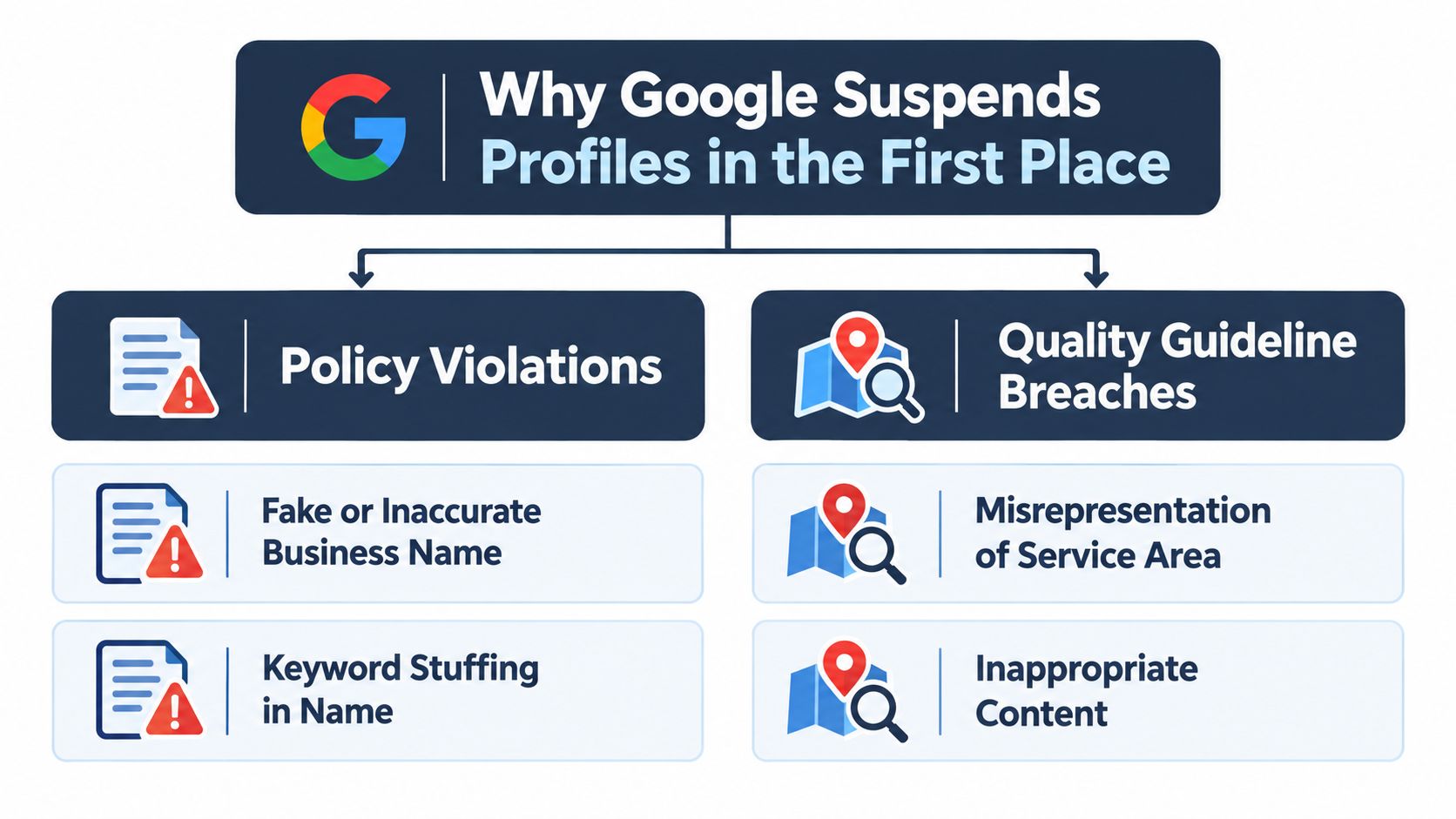
Policy violations that usually trigger hard suspensions
The obvious category includes things Google has long treated as identity abuse. A fake or altered business name, keyword stuffing in the name, PO boxes, virtual offices, or duplicate listings for the same business all signal that the profile is not representing a real, reachable operation. A suspended manager account can also spill over into the listing, because Google is checking who controls the profile as much as what the listing says.
For UK self-storage operators, this often appears in subtle ways. A site may have gate codes, a remote office, or a central head office, but the profile is still meant to describe the actual customer-facing business location or the correct service-area model. For solicitors, plumbers, and similar service-area businesses, the mistake is often the opposite, a hidden address model gets mixed with office-style language that makes the listing look like a storefront when it isn't.
Quality flags that people misread as policy breaches
Then there are the problems that aren't always malicious. An address can be hidden behind a rendering or display issue. NAP details can drift across directories. Ownership transfer can leave an account in a half-finished state. Service areas can be set too broadly or in a way that doesn't match the actual operating footprint.
The useful distinction is this, some suspensions are a direct response to rule-breaking, and some are data-quality flags that Google treats as identity uncertainty. That difference changes the first appeal. If the issue is a clear breach, fix it before appealing. If it's a quality flag, the appeal should clarify the business identity with proof, not over-explain the marketing story.
Diagnosing the Suspension Before You Appeal
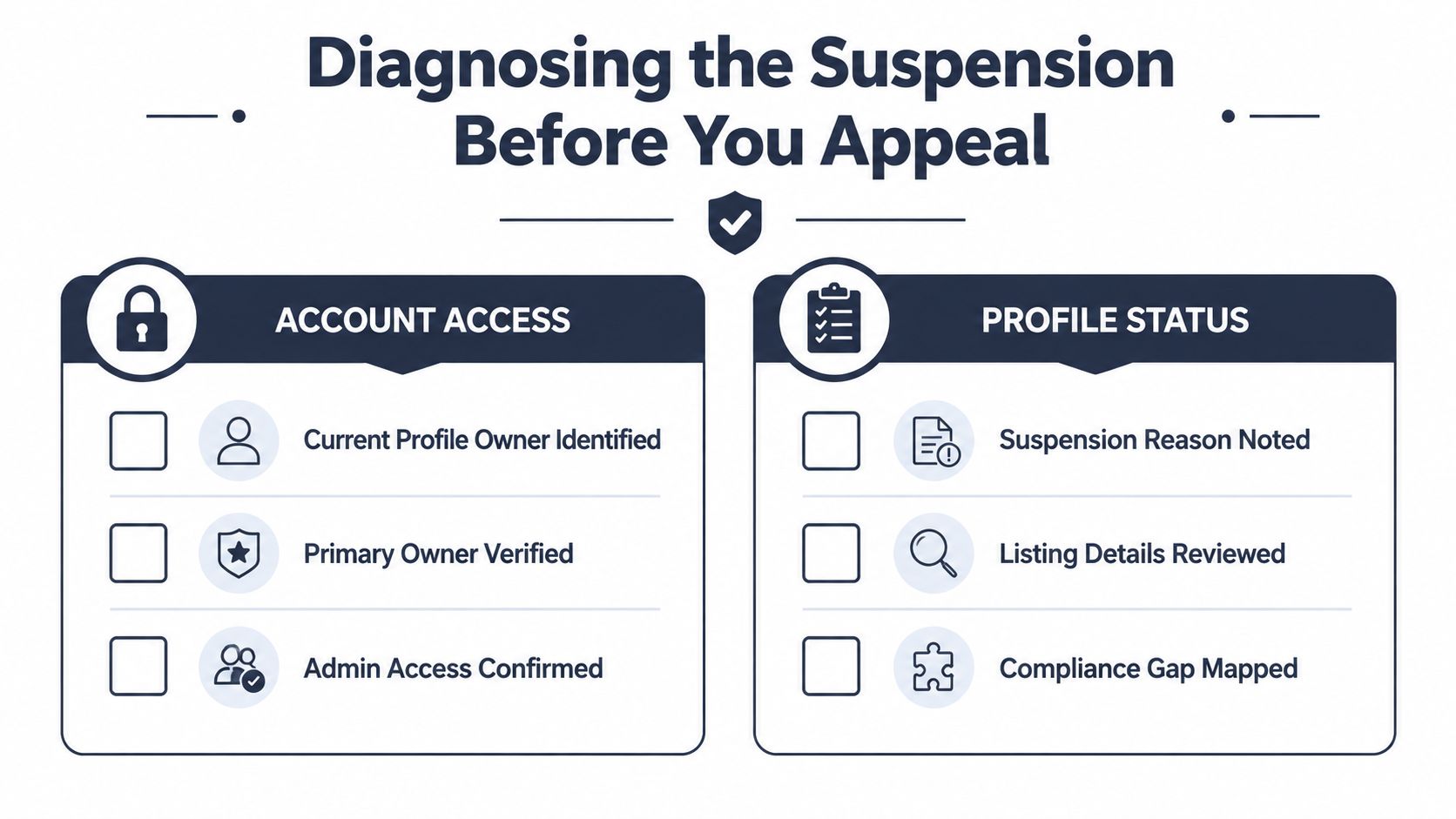
Before any form goes in, the account itself has to be checked. Who owns the profile now, is the primary owner still verified, and has a second manager disappeared without anyone noticing. Those access questions matter because a broken ownership trail can stall everything else.
Start with account control
If the profile sits inside the wrong Google account, the appeal can fail before the evidence is even considered. The owner should confirm whether the business email, the verified owner, and the current manager list all line up with how the profile is run. If a former agency, ex-employee, or third-party contractor still has access, that needs to be cleaned up before the case moves forward.
The internal profile audit also has to be blunt. Every editable field should be reviewed, including business name, category, service radius, description, photos, and recent posts. If something could read as policy-inconsistent, it should be identified now rather than discovered by Google later. A useful reference point is this local SEO audit resource, which helps structure the wider listing review around the profile, the website, and the citation trail.
Check the public record against the profile
NAP consistency is where many UK reinstatements wobble. The business name, address, and phone number should be compared across the website footer, major citation sources, and Companies House details. If the profile says one thing and the public footprint says another, Google often treats that as a legitimacy problem, even when the business is real.
If the diagnostics expose a genuine rule break, fix it first. If they expose a consistency problem, appeal with the evidence that explains the mismatch.
The same logic applies to a recent ownership transfer. A profile can look unstable after a handover, especially if categories, service areas, and access permissions changed at the same time. If the problem is clearly a quality flag, the appeal should be evidence-led and paired with the correction, not delayed while the listing is repeatedly edited.
Building a UK-Ready Evidence Pack That Counts
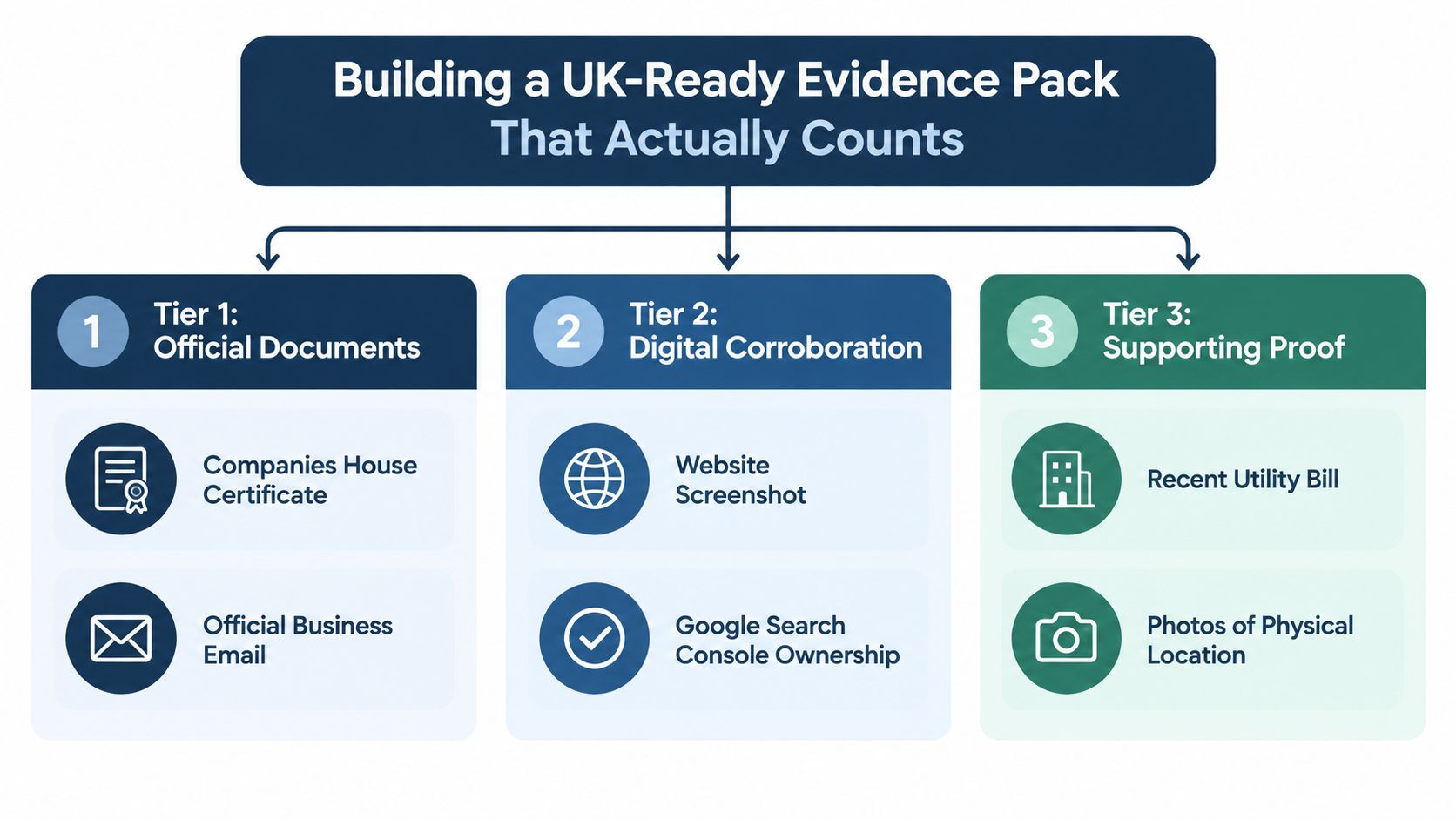
The appeal usually turns on the evidence pack. UK businesses often look for one perfect document, but Google tends to read the case as a hierarchy of proof.
Want a free audit like this for your own site?
We'll show you exactly what's holding your rankings and conversions back. No sales pitch.
Get My Free AuditUse the strongest documents first
Start with the record that most clearly matches the profile, then add documents that tie the same business to the same address or service area. For many UK cases, Companies House is the cleanest anchor because it confirms the legal entity. From there, VAT records, HMRC letters, and the right utility, rates, or lease documents add location proof.
UK-focused guidance points to Companies House registration, VAT records, utility or rates bills, and sector licences as the documents Google is most likely to accept, especially for service-area businesses and regulated firms (UK evidence guidance). That matters because a self-storage operator, a solicitor, and a food business do not prove legitimacy in the same way.
Before assembling documents, confirm what Google currently sees on the listing with this guide to checking your Google Business Profile. If the profile already reflects the wrong business name, address, or service setup, the evidence pack has to explain that mismatch, not pretend it does not exist.
Account matching also matters. If the reinstatement flow expects the right mailbox to own the case, Google Gmail Verification can help keep the domain and contact email aligned cleanly.
Submit files like a reviewer will inspect them
Once the files are ready, scan them cleanly, name them clearly, and upload them without hesitation. Blurry phone photos of paper certificates usually weaken the case because they force the reviewer to guess. The submission should be complete before opening the evidence form, especially in the UK flow where the supporting files must be attached within 60 minutes.
The evidence pack should also be matched to the problem. Some suspensions are true policy issues, but others are data-quality flags, where the profile, records, and public footprint do not line up. In those cases, the first appeal should read like a correction supported by documents, not a protest.
A self-storage case shows how this works. One rejected appeal was turned around only after the operator submitted a Companies House record, a recent utility or rates bill matching the site address, and a sector document showing the business was operating as a legitimate storage facility. The point is not that one document fixes every case. It is that the right mix of identity, location, and operational proof usually gives Google something it can verify.
Writing the Reinstatement Appeal That Gets Read
Most appeals fail because they read like a complaint. Google doesn't need the owner's frustration, it needs a clean statement that connects the business identity to the documents.
A simple structure works better than a long story
A useful appeal usually starts with one line identifying the business exactly as it appears on the official records. Then it lists the suspected trigger, the evidence attached, and a short operational description that shows genuine activity. That description should be factual, mentioning the address or service-area model, staffed hours, and the way customers interact with the business.
If the problem looks like a data-quality flag, it helps to frame it as a clarification rather than a fight over policy. That language is important because it signals that the business understands the difference between a wrong setup and a wrongful listing. Where a mistake really was made, the tone should acknowledge it plainly without grovelling or overexplaining.
A practical template looks like this.
- Business identity: “The profile represents [legal business name], operating from [address or service area] under the same ownership shown in the attached documents.”
- Likely trigger: “The suspension appears related to [category change, address inconsistency, ownership transfer, or another specific issue].”
- Evidence attached: “Supporting documents include Companies House confirmation, VAT or HMRC records, and a recent utility or lease document.”
- Operational note: “The business is active and reachable through the listed channels, with staffed hours and customer contact in place.”
When Google asks for more information, the reply should be short, direct, and punctual. A good follow-up email says that the requested files are attached, the business identity remains unchanged, and the reviewer can contact the owner through the same verified account if anything else is needed. That approach keeps momentum inside Google's short response window.
For businesses that struggle with file formatting, a separate operational issue can create trouble, too. A broken PDF hyperlink or badly assembled attachment package can waste time, and the browser PDF link fix with PDFKing is a useful reference when support documents need to behave properly inside a browser or review flow.
Handling a Rejection and Deciding Your Next Move
A rejection doesn't always mean the case is dead. It often means the evidence didn't yet match the way Google wanted to read the business identity, or the appeal repeated the same weakness in a slightly different form.
Read the rejection for clues, not drama
Google's rejection emails are short, but the wording can still reveal whether the problem was evidence, access, or identity mismatch. If the reply points toward missing or inconsistent documentation, the next submission should add new proof, not rephrase the same story. If the issue looks like an account problem, then the owner should fix the access chain before appealing again.
Practical reinstatement performance data suggests that first appeals commonly sit in the 60 to 75% success range, with well-prepared first submissions that include complete documentation often exceeding 80%, while later attempts drop sharply to roughly 40 to 50% on the second and 20 to 30% on the third (reinstatement success guidance). The takeaway is simple, one strong appeal usually beats a flurry of edits.
| Attempt | Approx. success rate | Recommended next action |
|---|---|---|
| First appeal | 60 to 75% | Submit once with the strongest evidence pack |
| Second appeal | 40 to 50% | Add new proof, don't just restate the case |
| Third appeal | 20 to 30% | Reassess the profile structure before trying again |
Escalation is sometimes sensible
If the form route stalls, support social channels or the community forum can help surface whether the case is stuck rather than refused. That doesn't guarantee reinstatement, but it can expose a routing issue or a missing verification step. A new profile should be the last resort, because duplicate records create NAP risk and can damage ranking continuity.
The worst move is a rushed rebuild with the same errors baked in again.
For some businesses, the safest decision is to pause, clean the evidence trail, and then decide whether a second appeal or a structural rebuild is the less damaging option. That kind of calm decision-making usually beats the instinct to click everything at once.
Keeping Your Profile Clean and Staying Reinstated
Reinstatement is not the finish line. Google often re-scans recovered profiles more closely, so the first 90 days after approval deserve the same discipline as the appeal itself.
Build habits that keep the profile stable
The safest routine is boring. Log in regularly, refresh photos when real changes happen, audit NAP consistency across the main UK citation sources, and respond to reviews and Q&A without letting the profile go stale. Manager access should stay tight, because loose permissions are an avoidable risk.
A few actions are especially likely to trigger another review. Address changes in the first 60 days, bulk category edits, and virtual office substitutions all deserve caution because they can make a recovered profile look unstable again. A more reliable maintenance loop is to treat the GBP as part of the business record, not as a marketing toy.
A simple prevention checklist helps:
- Keep business details identical: Match the name, address, and phone number everywhere.
- Limit access: Remove ex-agencies, old staff, and inactive managers.
- Update carefully: Make one meaningful change at a time.
- Use real proof: Store utility bills, licences, and company documents in one folder.
- Watch service areas: Keep them realistic and operationally true.
- Avoid virtual office language: Use only the location model the business operates.
- Refresh media legitimately: Upload photos that reflect current premises or services.
- Monitor reviews and Q&A: Respond as the business, not as a rushed administrator.
- Audit citations monthly: Check the main UK directories and the website footer.
- Document ownership changes: Keep a trail if the business or profile changes hands.
For owners who want a second pair of eyes after a reinstatement, a structured optimisation review can help catch weak points before Google does. Amax Marketing's Google Business Profile optimisation resource sits in that category, alongside other audit-led checks that focus on stability as much as visibility.
If a Google Business Profile suspension has cut off calls, directions, or local enquiries, Amax Marketing can review the profile, evidence trail, and wider citation consistency before the next appeal goes in. Visit Amax Marketing to ask about a reinstatement-focused audit and get a clearer view of what needs fixing before Google looks again.