Let's get straight to it. Technical SEO is all about optimising your website's nuts and bolts so that search engines like Google can easily find, understand, and index your pages. Think of it as the invisible scaffolding that holds your entire online presence together, making sure all the fantastic content and design you’ve created can actually be seen by your audience.
Why Your Website's Foundation Matters More Than You Think
Imagine you’ve built a stunning new library. It’s filled with incredible books (your content), the covers are beautifully designed (on-page SEO), and glowing reviews are bringing people to the door (off-page SEO). But inside, the lighting is poor, the aisles are a maze, and there’s no catalogue. That’s a website with bad technical SEO.
Technical SEO is the very architecture of that library. It’s the solid foundation, the logical floor plan, and the clear signage that helps the head librarian (Google) effortlessly explore every shelf, categorise every book, and recommend them to the right readers. Without that solid structure, even the most brilliant books will just gather dust.
The Four Pillars of Technical SEO
To make this easier to grasp, we can break down the core of technical SEO into four main areas. Each one plays a critical role in how search engines and users experience your site.
| Technical SEO Pillar | Primary Goal |
|---|---|
| Crawlability & Indexing | Ensure search engines can discover and store all your important pages. |
| Site Architecture & Experience | Create a logical, fast, and user-friendly structure for both bots and humans. |
| Schema & Semantics | Help search engines understand the meaning and context of your content. |
| Security & Trust | Build confidence with users and search engines through a secure connection. |
These pillars work together to build a website that's not just visible, but also authoritative and trustworthy in the eyes of search engines.
The Real-World Pay-off for a Solid Foundation
It's easy for business owners to get caught up in the flashy side of marketing—the blog posts, the social media campaigns—and completely overlook the technical health of their website. That's a huge misstep. A clunky, slow, or insecure site doesn't just annoy potential customers; it actively tells search engines that your site isn't worth ranking highly.
For businesses here in the UK, getting this foundation right pays dividends, and fast. A recent industry report focused on UK companies found that technical SEO delivers an average return on investment (ROI) of a whopping 117%. Even better, most businesses saw a full return on their spending in just six months. That’s nearly twice as fast as you’d typically see from content marketing alone, proving just how powerful it is for driving organic growth. You can dig into more UK performance data about technical optimisation over on Reboot Online.
At the end of the day, technical SEO isn’t just about making search engine bots happy. It’s about creating a fast, intuitive, and secure experience for the real people visiting your site. When search engines can crawl and comprehend your website with ease, they see it as a quality result, and that’s when they reward you with better rankings.
A strong technical setup isn't a luxury; it's a must-have for any business that wants to compete online. It’s the silent partner working tirelessly behind the scenes, ensuring your brilliant content gets the visibility it truly deserves.
The Core Components of a Healthy Website
To really get to grips with technical SEO, we need to pop the bonnet and have a look at the individual parts that help a website run smoothly for search engines. These elements all work together, making sure your content isn't just visible, but also accessible, quick to load, and trustworthy. Think of them as the vital systems in a car—if one part fails, the whole vehicle suffers.
Each component here addresses a specific job that search engines like Google need to do when they visit your site. From making sure they can get in the front door to understanding the layout of the rooms, getting these technical signals right is non-negotiable for success.
This diagram shows how your website’s content and its supporting technical infrastructure are connected.
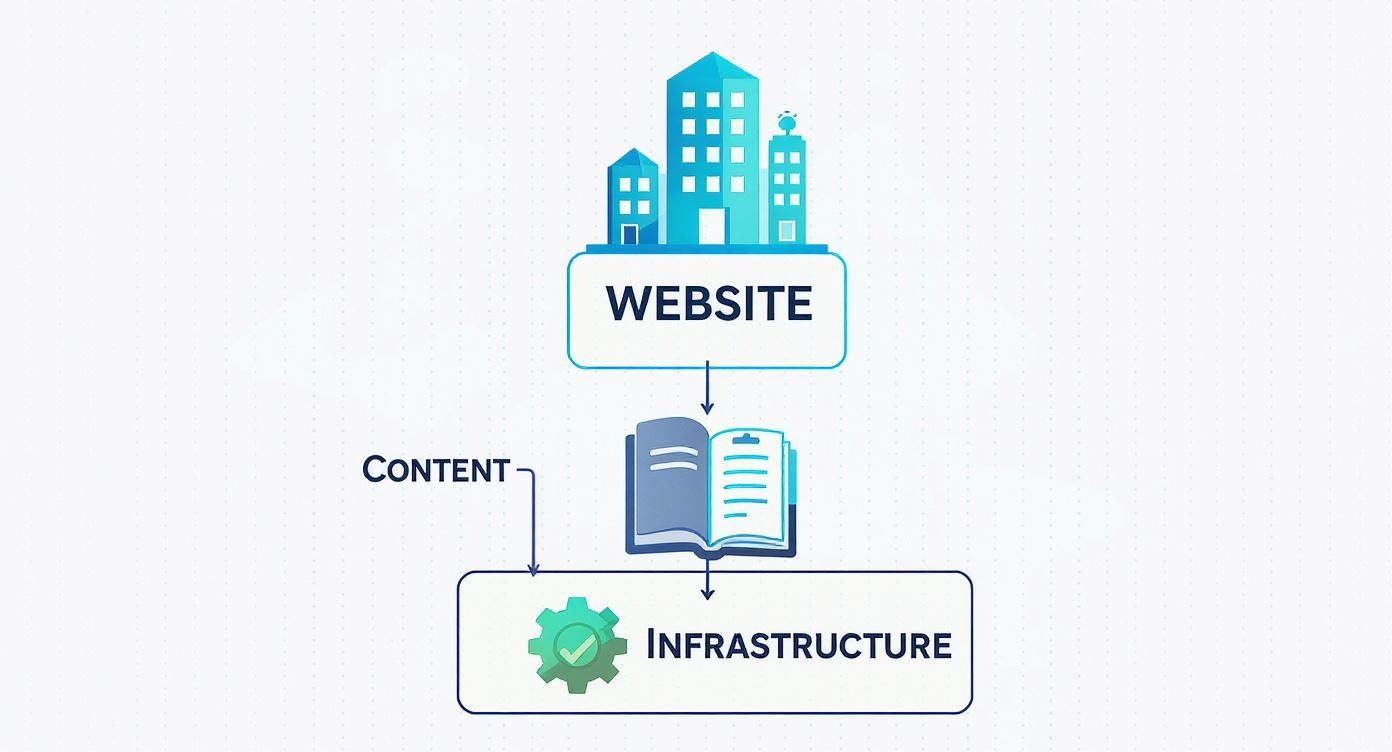
As you can see, while your audience interacts with the content, it all relies on a solid technical foundation to even get discovered and delivered in the first place.
Crawlability and Indexing
Before Google can rank your website, it has to find it and then add it to its enormous digital library. This is a two-step process known as crawling and indexing.
- Crawlability is all about access. Can search engine bots (or 'spiders') easily move through your website's pages? It’s like making sure all the doors in a building are unlocked and the hallways are clear.
- Indexing is what comes next. After crawling a page, the bot decides if it's worth storing in its index. Once a page is indexed, it’s officially in the running to appear in search results.
It’s simple, really. If a search engine can't crawl or index a key page on your site, that page is completely invisible to anyone searching online.
Logical Site Architecture
A well-organised website structure is like a clear map for both users and search engines. It helps Google understand the hierarchy of your content and how different pages relate to each other.
Imagine trying to find a specific item in a massive supermarket that has no aisle signs. It would be a nightmare! A logical site architecture provides those signs, guiding bots to your most important pages and helping them understand what your site is about. This clarity also creates a much better experience for human visitors, making your site a breeze to navigate.
The Need for Speed
We live in an age of instant gratification, and page speed is absolutely critical. A slow-loading website is a massive turn-off for visitors. In fact, studies show that conversion rates can drop by an average of 4.42% with every extra second a page takes to load. A cornerstone of technical SEO is delivering a fast, responsive experience, which means knowing how to optimize website performance is key.
From Google's point of view, a fast website is a healthy website. Speed has a direct impact on user satisfaction, which is precisely why page speed—measured by metrics called Core Web Vitals—is a confirmed ranking factor.
Optimising your images, speeding up server response times, and cleaning up your code are all technical jobs that lead to a faster site. For a deeper dive, check out our guide on how to improve website loading speed.
Mobile-First and Security Matters
There are two other foundational elements that are now standard expectations for any modern website: being mobile-friendly and being secure.
- Mobile-First Indexing: Google now primarily uses the mobile version of a website for indexing and ranking. If your site doesn't work perfectly on a phone, your rankings will suffer—no matter how good it looks on a desktop.
- HTTPS Security: An SSL certificate, which gives you the "HTTPS" in your URL, is a must-have. It encrypts the connection between a user's browser and your website, protecting their information. Search engines prioritise secure websites, and modern browsers will actively warn users away from non-secure sites, which can instantly destroy trust.
Advanced Technical Concepts, Explained Simply
Beyond the basics, a few more advanced pieces are vital for a technically sound website.
- Structured Data: This is a specific type of code (often called schema markup) that you can add to your site to give search engines extra context. It helps them understand if a piece of text is a recipe, an event, or a product review, which can earn you eye-catching "rich snippets" in the search results.
- Canonicalisation: It's quite common for the same content to be accessible via multiple URLs, which creates duplicate content problems for search engines. A canonical tag is a simple line of code that points search engines to the "master copy" that should be indexed, consolidating all your ranking power into one place.
- Hreflang Tags: If your website serves content in different languages or to different countries, hreflang tags are essential. They tell Google which language and regional URL should be shown to users in a specific location, making sure the right audience always sees the right version of your content.
Why Technical SEO Actually Drives Business Growth
It’s one thing to understand the bits and pieces of technical SEO, but the real magic happens when you connect those backend fixes to tangible business results. A technically sound website isn't just an IT project to tick off a list; it’s a powerful engine for growing your revenue, building your brand, and creating sustainable success. This is the point where cleaning up your code directly translates into more profit.
Think of it like this: even the world's best sales pitch is useless if the customer can't hear you through a crackly phone line. Technical glitches on your website create that exact same static, breaking the connection between you and your potential customers. On the flip side, a fast, secure, and intuitive site builds a smooth pathway from someone discovering you on Google to them becoming a paying customer.
This connection is so important because a strong technical foundation builds trust. When a user has a smooth, frustration-free experience, they instinctively see your brand as more professional and reliable. For search engines, a technically healthy site is a massive quality signal, encouraging them to reward you with better rankings and more visibility.
Driving Sales for E-commerce Brands
For any online shop, technical SEO is non-negotiable. The digital high street is incredibly competitive, and the smallest bit of technical friction can send a potential buyer clicking over to a rival in a heartbeat.
Here’s how a solid technical setup directly boosts sales:
- Faster Load Times Reduce Cart Abandonment: Nothing kills a sale faster than a slow-loading product page or a checkout that hangs. Optimising your site speed keeps shoppers engaged and moving smoothly toward the 'buy' button.
- Better Indexing Means More Visible Products: If Google can’t find and understand your product pages, they might as well not exist. Proper site architecture and sitemaps make sure every single item you sell is discoverable.
- Structured Data Creates Standout Listings: Using schema markup for products can generate those eye-catching "rich snippets" in search results—showing star ratings, prices, and stock levels. These listings jump off the page and can seriously increase click-through rates from qualified buyers.
Boosting Visibility for Local Businesses
Technical SEO is also a game-changer for businesses that serve a local community, whether you're a plumber, a café, or a solicitor. For these businesses, getting seen in local search results and on Google Maps is everything.
A well-optimised site sends strong local signals to search engines. A mobile-friendly design is absolutely critical, as most people looking for local services are doing it from their phones. What's more, adding local business schema helps Google instantly understand your location, opening hours, and services, making it far more likely to feature you in the coveted "local pack" at the top of the results.
Technical optimisation isn’t just about being found online; it’s about creating a superior user experience that builds trust and encourages conversions. When your website works flawlessly, it reflects the quality and reliability of your entire business.
Adapting to a Constantly Changing Search Environment
The world of search never stands still; algorithm updates regularly rewrite the rules of the game. In the UK, these updates can have a massive impact, which is why ongoing technical maintenance is so essential. For instance, a major Google core update recently caused a huge spike in website impressions for UK sites, with some seeing traffic nearly double overnight. You can get more insights on how Google's technical demands shape local search from SEO Steph's UK traffic analysis.
This just goes to show that keeping on top of technical best practices isn't optional—it's a requirement for survival and growth. Ultimately, investing in your site's technical health is one of the smartest moves you can make. It builds a resilient foundation that supports all your other marketing efforts and is a direct investment in your ability to increase organic traffic and achieve long-term success.
Your First Technical SEO Audit Checklist
Ready to look under the bonnet? Running your first technical SEO audit isn't nearly as daunting as it sounds. Think of this checklist as your guide to spotting the most common problems and scoring some quick wins, all without needing to be a coding guru.
This is all about giving your website a routine health check. We'll break it down into simple, manageable steps, focusing on the low-hanging fruit that can genuinely improve your rankings and make your visitors happier.

Check Your Indexing Health
First things first: are your important pages even visible to Google? If a page isn't indexed, it’s completely invisible in the search results. It might as well not exist.
Your go-to tool here is Google Search Console. It’s a free service that gives you a direct line to how Google sees your site. Once you’re set up, find the 'Pages' report under the 'Indexing' section.
You'll want to compare the number of pages marked "Indexed" versus "Not indexed". If you see a lot of your key pages sitting in the "Not indexed" pile, that's a huge red flag that needs your immediate attention.
A healthy site has the vast majority of its valuable pages indexed. Common culprits for non-indexed pages include rogue 'noindex' tags, accidental blocks in your robots.txt file, or persistent crawl errors. Fixing these gives your content a fighting chance.
Analyse Your On-Page Technical Elements
Next up, let's zoom in on the individual pages themselves. These are the details that help search engines make sense of your content and structure, and thankfully, they're often straightforward to fix.
Here's what to keep an eye on:
- Title Tags and Meta Descriptions: Is every single one unique? Do they accurately sum up the page's content? Duplicate or missing titles are a classic way to confuse search engines.
- Heading Structure (H1, H2, etc.): Does each page have one, and only one, H1 tag? Are H2s and H3s used to create a logical flow? A clean hierarchy is a gift to both search engine bots and human readers.
- Broken Links: Do all your links actually go somewhere? Broken links (which send users to a 404 error page) create a dead-end experience and waste precious link authority. A free broken link checker can hunt these down for you.
When you're just starting out, a good SEO tool can save you hours of manual work. For instance, a detailed SE Ranking review shows how platforms like it can automatically crawl your website and flag these on-page issues, letting you focus on fixing them instead of finding them.
Evaluate Site Speed and Mobile Experience
How your site actually performs for a real person is a massive piece of the technical SEO puzzle. A slow, clunky website will send visitors bouncing away and signal to Google that your site doesn't deliver a quality experience.
- Test Your Page Speed: Pop a URL into Google's PageSpeed Insights tool. It will spit out a performance score for both mobile and desktop, along with specific, actionable advice. The usual suspects? Oversized images and inefficient code.
- Check Mobile-Friendliness: With Google's mobile-first indexing, this isn't optional. Use Google's Mobile-Friendly Test to see exactly how your pages look on a small screen. The text should be readable without pinching to zoom, and buttons need to be easy to tap.
Review Your Site Security and Accessibility
Finally, let's nail down the foundations. You need to confirm your site is secure for visitors and fully accessible to search engine crawlers. Getting this right builds trust with both people and Google.
- Check for HTTPS: Your website's address should always start with
https://, nothttp://. That 'S' stands for secure. If it's missing, visitors get a nasty warning in their browser, which is a real credibility killer. - Review Your robots.txt File: This simple file is the rulebook that tells search engines where they can and cannot go on your site. A single misplaced line can accidentally hide your entire website from Google. Make sure you aren't blocking any important sections.
- Find Your XML Sitemap: Think of an XML sitemap as a map of your website, created specifically to help search engines find all your important content. Check that you have one and that it has been submitted to Google Search Console.
This checklist is a fantastic starting point for spotting the technical issues that have the biggest impact. For a much more detailed walkthrough, grab our complete technical SEO audit checklist here—it dives even deeper into every one of these areas.
Solving Common Technical SEO Problems
Okay, your technical audit has flagged some issues. Think of that report as a diagnostic printout from the garage—now it’s time to get under the bonnet and fix what’s broken. Finding the problems is one thing, but actually rolling up your sleeves and implementing the solutions is what truly separates a high-performing website from one that’s stuck in second gear.
This is your practical repair guide. We’ll tackle some of the most common technical SEO headaches I see every day: sluggish page speeds, confusing duplicate content, and those pesky broken links that frustrate users and search engines alike. For each one, I’ll explain not just how to fix it, but why it’s holding you back. Let’s turn that audit into a clear, prioritised action plan.
Fixing Slow Page Speed
A slow website is a conversion killer. Simple as that. If your audit highlighted poor load times, this needs to be at the top of your list. It’s a massive factor for user experience and, consequently, your search rankings.
So, what are the usual suspects? Nine times out of ten, it’s oversized media files and clunky code. Your first port of call should be image compression. You can use modern tools to shrink file sizes significantly without any noticeable drop in quality, giving you an immediate speed boost.
Next up, look into browser caching. This clever trick lets a visitor's browser save parts of your site locally. When they come back, the page loads almost instantly because it doesn't need to be downloaded all over again.
Tackling Duplicate Content Issues
Duplicate content is a real head-scratcher for search engines. When Google finds the same (or very similar) content on multiple URLs, it gets confused. It doesn't know which one is the original, which one to rank, and ends up splitting the authority between them. This dilutes your SEO power.
Luckily, the canonical tag is your best friend here. The fix is to decide which page is the "master" version. Once you've chosen it, you add a canonical tag to all the duplicate pages, pointing them back to that master URL.
Think of it like this: a canonical tag tells Google, "Hey, I know these pages look similar, but this is the one I want you to pay attention to and rank." It consolidates all your SEO value into a single, authoritative source.
It’s a deceptively simple solution. With just one line of code, you clear up the confusion, merge all that diluted ranking power, and make sure the right page shows up in the search results.
Repairing Broken Links and Redirects
Broken links, or 404 errors, are dead ends. For a user, clicking a link only to find nothing is frustrating. For a search engine crawler, it's a sign of a poorly maintained site and a complete waste of its time and resources (what we call "crawl budget").
Your audit should have given you a neat list of every broken link. The fix is a two-step process:
- For internal links (linking to other pages on your own site), you simply need to go in and update the link to point to the correct, live page.
- For broken backlinks (links from other websites pointing to a page on your site that no longer exists), you should set up a 301 redirect. This permanently forwards anyone—and any SEO value—from the old URL to a new, relevant page.
Implementing Missing Structured Data
Structured data, or schema markup, is one of the most powerful yet surprisingly underused tools in the technical SEO arsenal. It’s a layer of code that gives search engines crystal-clear context about what’s on your page, which they can then use to create those eye-catching "rich snippets" in the search results.
In the UK, getting this right can give you a serious edge. It’s staggering, but around 31.2% of websites have no schema markup at all. Yet, adding it can increase click-through rates by up to 40%. With Google now rewriting 76% of title tags, using strong technical signals like structured data helps you reclaim some control over how you appear. You can find more stats on how technical SEO affects UK search on Exploding Topics.
To get started, identify key pages—like your products, services, or top articles. Use a tool like Google's Structured Data Markup Helper to generate the right code. Adding this schema not only helps Google understand your content but makes your listing pop on a crowded results page.
Got Questions About Technical SEO? We've Got Answers.
As you start to get your head around technical SEO, it’s completely normal for a few questions to surface. It can feel like a complicated corner of the marketing world, but when you break it down, it's far more straightforward. Let’s walk through some of the most common queries we get from business owners just like you.
Our aim here is to cut through the jargon, clear up the confusion, and give you the confidence to start improving your site's technical health.
How Often Should I Run a Technical SEO Audit?
This is a great question. For most websites, a really thorough technical audit every three to six months is the sweet spot. That sort of rhythm helps you catch any creeping issues before they grow into bigger problems that could genuinely damage your search rankings.
But that doesn't mean you can just set it and forget it in between those deep dives. It’s a good habit to run monthly health checks on the big-ticket items like crawl errors, site speed, and any new broken links. And, of course, if you're planning a major change—like a site redesign, moving to a new platform, or a massive content update—you absolutely must run a full technical SEO audit straight afterwards.
Can I Do Technical SEO Myself, or Do I Need to Hire an Expert?
The short answer is: it depends. You can definitely handle the basics of technical SEO on your own, especially if you have a solid checklist to work from. Many of the fundamental tasks are perfectly manageable for a savvy business owner or marketer.
Things you could probably tackle yourself include:
- Finding and fixing broken internal links.
- Compressing massive image files that are slowing your pages down.
- Writing unique page titles and meta descriptions for your most important pages.
- Making sure your pages have a logical heading structure (one H1, then H2s, etc.).
However, when you get into the really thorny stuff, bringing in an expert is a smart move. Complex jobs like managing a tricky site migration, setting up hreflang tags correctly for an international audience, or digging deep into crawl budget issues really do need a specialist hand to get them right the first time.
Think of it like maintaining your car. You can handle checking the oil and topping up the windscreen wash. But when it's time for a major engine service, you call in a mechanic.
What’s the Difference Between Technical SEO and On-Page SEO?
This question comes up all the time, and it's a crucial distinction to understand. The easiest way to picture it is by thinking of your website as a house.
Technical SEO is the foundation and structure of that house. It's the solid concrete base, the well-built walls, and the reliable electrical wiring. It’s all about making sure the building is sound, safe, and easy for Google's bots (the postman) to find the front door and navigate inside.
On-page SEO, on the other hand, is the interior design. It's the content, the keywords you use, the images on the walls, and the internal links that lead from one room to another. On-page is all about making the inside of the house valuable, engaging, and welcoming for your visitors.
You need both to succeed; they’re two sides of the same coin. You could have the most beautifully decorated house in the world (perfect on-page SEO), but if the foundations are cracked (terrible technical SEO), no one will want to be inside. Equally, a perfectly built house with empty rooms (no on-page SEO) isn't very helpful to anyone who steps through the door.
Ready to turn these answers into action? At Amax Marketing, we specialise in taking complex technical SEO problems and turning them into clear, effective strategies that deliver real results. Let us worry about the foundations so you can focus on your business. Book your complimentary marketing audit today and let's unlock your website's true potential.