
If you want to rank higher on Google Maps, the first and most important place to start is your Google Business Profile (GBP). This isn't just another online directory listing; it's your digital shopfront and the single biggest lever you can pull for local search visibility.
Master Your Google Business Profile
Think of your Google Business Profile as the command centre for how customers see you on Google Maps and in those crucial local search results. A complete, accurate, and active profile is a massive trust signal for Google, and it directly impacts how you rank. It’s not a "set it and forget it" task. You need to strategically optimise every single field to prove your relevance and authority in your local area.
Put yourself in the customer's shoes. When someone searches for "self-storage near me," Google’s algorithm instantly sifts through countless profiles to find the best possible match. It’s always going to favour the businesses that give the most detailed, correct, and helpful information. A half-finished profile is like a shop with an empty window display—it just doesn't inspire confidence or draw anyone in.
Fine-Tune Your Business Categories
Getting your categories right is one of those foundational things that has a huge ripple effect. Your primary category needs to be laser-focused on what you do. For a self-storage business, that's "Self-storage facility"—not something vague like "Storage." Be specific.
But don't stop there. Secondary categories are your chance to cast a wider net and show up for related searches. Think about everything else you offer.
- Moving company: If you offer van hire or moving help.
- Packing supply store: If you sell boxes, tape, and all the moving essentials.
- Truck rental agency: If people can rent trucks directly from you.
Every category you add is another keyword you can potentially rank for. Just make sure it’s a genuine service you offer; misleading Google or your customers will only backfire.
Craft a Compelling Business Description
You have 750 characters for your business description—make them count. This is your elevator pitch. It’s the perfect spot to explain what makes you different while naturally weaving in the keywords your customers are actually searching for.
Don't just state the obvious. Instead of "We offer self-storage units," try painting a picture:
"Need secure and affordable self-storage in Manchester? We provide clean, CCTV-monitored units in all sizes, from small lockers to large garage-style spaces. With 24/7 access and a friendly team on-site, we make storing your belongings simple and safe. We also have a full range of packing supplies and van hire to make your move easier."
See the difference? This version seamlessly includes terms like "secure self-storage," "Manchester," "packing supplies," and "van hire," all while giving the reader real, valuable information.
Leverage Services and Attributes for Detail
The 'Services' section is where you can really get granular. Don't just list "Storage Units." Break it down into every specific service you offer. For a self-storage facility, that could look like:
- 5×5 Foot Storage Unit
- 10×10 Foot Storage Unit
- Climate-Controlled Storage
- Vehicle Storage
- Business and Document Storage
Each one of these is a keyword that could trigger your profile in a search. On top of that, you have attributes. These are the quick-glance tags that tell customers key info, like "Wheelchair-accessible entrance" or "24-hour access." These details not only help customers but also help Google match your business to more specific, high-intent searches.
Stay Active with Google Posts
Consistency is everything in local SEO. Using Google Posts regularly shows the algorithm that you're an active, engaged business. And the data backs this up. Businesses that post regular updates appear in the top 3 Google Maps results 2.8 times more often than those that stay silent.
Use Posts to share things like:
- Offers: "Get your first month of storage for just £1!"
- Updates: "Our new climate-controlled units are now available."
- Events: "Join our community charity drive this Saturday."
These updates keep your profile looking fresh and give you yet another way to use important keywords and strong calls to action. A well-oiled profile is the bedrock of any solid local SEO plan. To really get this right, you can dive deeper with this comprehensive Google My Business Optimisation Guide for more advanced tactics. To see how GBP fits into the bigger picture, our guide on local SEO for small business puts it all into context.
Build Local Trust with Reviews and Citations
Beyond just ticking boxes on your profile, Google Maps wants to see that your business is a real, trusted part of the local community. This isn't something you can fake or build overnight. It’s earned through two critical activities: gathering a solid base of customer reviews and making sure your business details are consistent everywhere online. Get these two right, and you're sending strong signals to Google that you’re a prominent, reliable choice, which directly impacts how high you rank.
Think of it this way: you trust a friend's recommendation, right? Online reviews do the same job but for thousands of potential customers. They’re a powerful form of social proof, and a huge majority of people rely on them to find local businesses.
Keeping your profile optimised is an ongoing job, not a one-and-done setup. It involves regularly checking your categories, updating services, and using Posts to stay engaged.
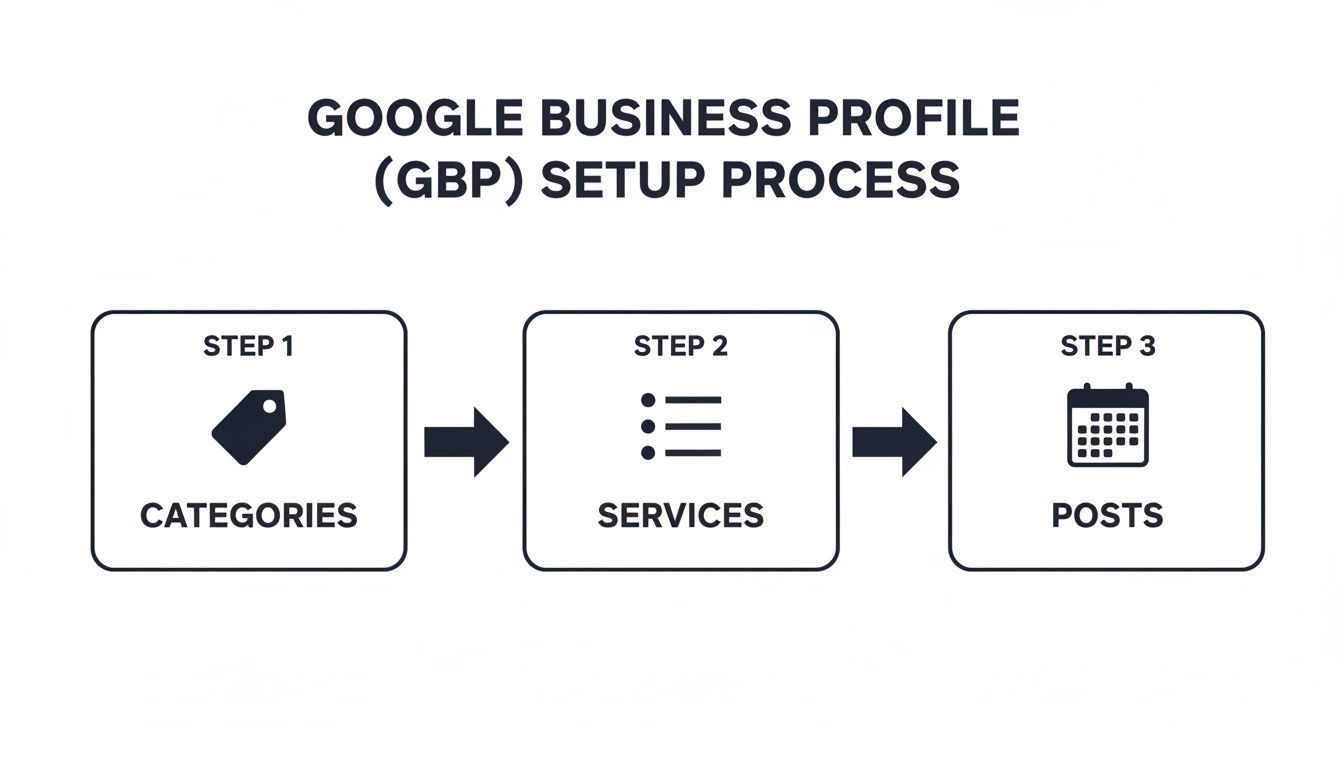
This visual really hammers home that maintaining an active profile is a continuous effort.
Cultivate a Proactive Review Strategy
Just waiting for reviews to trickle in is a slow-burn strategy that rarely works. You need a simple, repeatable process to actively encourage your happy customers to share their feedback. The secret is asking at just the right moment—when the positive experience is still fresh in their mind.
For instance, a self-storage facility could set up an automated email to go out a week after a customer has moved all their stuff in. It’s a perfect time. The email can thank them for choosing their facility and include a direct, no-fuss link to leave a Google review.
It’s also absolutely crucial to respond to every single review, good or bad.
- For positive reviews: A quick, "Thanks so much for the kind words, we're thrilled you had a great experience!" shows you're listening and you appreciate their business.
- For negative reviews: A prompt, professional reply that acknowledges the problem and offers a way forward can completely turn a bad situation around. It shows every potential customer reading it that you take feedback seriously and are committed to getting things right.
A thoughtful response to a negative review isn't just for the unhappy customer; it's for every future customer who reads it. It shows accountability and can often be more powerful than a dozen five-star reviews.
To really cement your local reputation, you could even explore using loyalty features for Maps Reviews to encourage repeat customers and more positive feedback, giving your Google Business Profile and local trust a serious boost.
Master NAP Consistency and Citations
The second pillar of local trust is all about consistency. A citation is simply any online mention of your business's Name, Address, and Phone Number (NAP). These pop up in all sorts of online directories, from big names like Yelp and Thomson Local to smaller, industry-specific sites. Google’s algorithm scours the web for these citations to verify that your business information is correct.
Inconsistencies are a killer. An old address on one directory, a slightly different business name on another—it all creates confusion and erodes Google's trust. If Google isn't 100% sure which information is right, it will hesitate to show your profile to searchers. It’s a foundational piece of the puzzle that so many businesses get wrong.
Audit and Build Your Citation Profile
First things first, you need to conduct an audit. Start searching for your business online and see what you find. Make a list of every directory you’re on and check for any inconsistencies in your NAP details. The usual culprits are:
- Slight variations in your business name (e.g., "A1 Storage Ltd" vs. "A1 Storage").
- Formatting differences in your address (e.g., "Street" vs. "St.").
- Old phone numbers that are no longer in use.
Once you’ve found the errors, the legwork begins. You'll need to contact each site and ask for the information to be corrected. Yes, it’s a bit tedious, but it's absolutely essential for building a strong local SEO foundation.
After you've cleaned up your existing listings, it's time to build some new, high-quality citations. Focus on reputable UK-based directories and websites that are relevant to your industry. For a self-storage business, that could mean getting listed on a local moving services aggregator or a regional business association website.
Building a clean, consistent, and robust citation profile sends powerful signals that reinforce your legitimacy and will help you climb those Google Maps rankings. You can learn more about how these signals fit into the bigger picture in our detailed guide on local SEO tactics.
Strengthen Your Website for Local SEO
Let's be clear: your website is more than just a digital business card. It’s the bedrock of your entire local search strategy. When Google decides who gets those coveted spots in the Maps pack, it doesn't just glance at your Google Business Profile in a vacuum. It cross-references everything with your website to verify that you’re a legitimate, relevant, and authoritative local business.
Think of it this way: your GBP is the headline, but your website provides the detailed story. If the story on your website is weak or contradicts your profile, it raises red flags for the algorithm. But when they are perfectly in sync, they work together to build an undeniable case for why you deserve to be at the top. This synergy is non-negotiable for ranking on Google Maps.
Create Dedicated Location Pages
If your business serves multiple areas or has more than one physical branch, dedicated location pages are an absolute game-changer. I’m not talking about just copying your homepage and swapping out the city name. These need to be unique, valuable pages tailored to each specific community.
For example, a self-storage business in Manchester should have a page like /self-storage-manchester. This page needs its own unique flavour.
- Truly Local Content: Talk about how you help students from the University of Manchester store their things over the summer. Mention nearby landmarks or business parks you serve.
- Embedded Google Map: Don't just list the address. Embed an interactive Google Map directly on the page. It's a massive trust signal for Google.
- Unique NAP: The Name, Address, and Phone number for that specific location must be prominently displayed and be an exact match for its corresponding GBP listing.
Doing this turns your site from a generic business website into a network of local hubs. Each page acts as a powerful anchor, reinforcing your presence in that community and dramatically improving your chances of ranking there.
Weave Local Keywords into Your Content
You need to help Google connect the dots between your services and the locations you serve. This is where weaving local keywords into your website content comes in. It’s not about clumsily stuffing "self-storage in London" into every paragraph. It’s about naturally referencing your service areas where it makes sense.
Look for opportunities on pages like your:
- Homepage
- About Us page
- Contact page
- Blog posts
A blog post titled "5 Tips for Downsizing Your Home in Bristol" is a perfect example. It naturally targets customers in that specific area and tells Google that you're not just another faceless company, but an active expert within the Bristol community.
Implement Local Business Schema Markup
Alright, time to get a little technical—but the payoff is huge, I promise. Local Business schema is a piece of code you add to your website that essentially speaks to search engines in their native language. It explicitly tells them your business name, address, phone number, opening hours, and what you do, all in a neat, structured format they can instantly understand.
Adding schema markup removes all the guesswork for Google. Instead of trying to figure out your details from plain text, you're handing them over on a silver platter. This massively increases Google's confidence in your data, which is a significant ranking factor. It's one of the most powerful ways to ensure your website and GBP are telling the same story.
To help visualise how these signals work together across your website and profile, here’s a quick comparison:
Key Local SEO Signals On-Page vs GBP
| Signal Type | On-Page SEO Implementation | Google Business Profile Implementation |
|---|---|---|
| Location | Name, Address, Phone (NAP) in footer/contact page. Embedded Google Map on location pages. | NAP details filled out. Service areas defined. Map pin accurately placed. |
| Relevance | Title tags and headers with local keywords (e.g., "Self-Storage in Leeds"). Locally-focused blog content. | Primary and secondary business categories selected. Services list completed. |
| Authority | Inbound links from other local websites. Testimonials from local customers on-page. | Customer reviews and owner responses. High-quality photos of the business. |
| Trust | Consistent NAP across the entire website. Local Business schema markup added to code. | Regular updates and posts. Completeness of profile (all sections filled out). |
As you can see, both your website and your GBP need to send consistent, reinforcing signals about who you are, where you are, and what you do.
While implementing schema might sound daunting, you can generate the code with free online tools and add it to your website's header. For a deeper dive into the technical side of things, running through a comprehensive technical SEO audit checklist can help you spot and fix these crucial foundational issues. It’s a vital step for any business that's serious about winning in local search.
Drive Engagement with Behavioural Signals
Once you've nailed the technical side of your profile, it’s time to focus on something more dynamic: behavioural signals. Think of these as the digital body language of your customers. Every time someone clicks for directions, calls your number, or taps through to your website from your listing, they’re sending a clear message to Google.
That message? "This business is relevant and popular." Google pays close attention to how people interact with your profile to figure out if it's genuinely useful. A listing buzzing with activity will always be seen as a more valuable result than one that just sits there, gathering digital dust. This real-world interaction is a massive piece of the local SEO puzzle.
Encourage High-Value Clicks
The goal here is simple: turn scrollers into clickers. Don't just present information—give people a compelling reason to take the next step. This all starts with how you write your business description and, crucially, your Google Posts. They need clear, punchy calls-to-action (CTAs).
It's a subtle but important shift from passive to active language.
- Weak: "We have storage units available."
- Strong: "Ready to declutter? Click to call our team for a free quote on your perfect storage unit."
See the difference? You're not just stating a fact; you're prompting an action. These high-value clicks—calls, direction requests, website visits—are powerful, often underestimated, ranking factors. As you can find out from further reading on hidden ranking factors on 99quidwebsites.co.uk, these user signals carry significant weight in Google's algorithm.
Boost Engagement with Visuals
Great photos and videos aren't just for show. They dramatically increase the time people spend on your listing, which is another crucial behavioural signal for Google. A well-stocked photo gallery encourages potential customers to stick around and explore.
Put yourself in the shoes of someone looking for a self-storage unit. What would they want to see?
- Clean, well-lit hallways: This builds immediate trust.
- A range of unit sizes: Helps them visualise the space they're paying for.
- Visible security features: Show them your CCTV, secure gates, and individual alarms.
- A quick video tour: A simple walk-through of the facility can be incredibly persuasive.
Profiles with plenty of quality visuals feel more alive and keep people engaged for longer. That extended "dwell time" is a massive thumbs-up to Google's algorithm.
Turn Your Q&A into a Resource
That Questions & Answers section on your profile? It’s an engagement goldmine that most businesses completely ignore. When a potential customer posts a question, they're literally asking you to engage with them. Answering quickly is a must, but you should also get proactive.
Start by "seeding" your Q&A with the questions you hear every single day. This does two things brilliantly: it provides instant answers for other people wondering the same thing, and it shows you're an active, helpful business.
By pre-emptively answering common questions, you turn your GBP into a self-service information hub. This not only helps customers but also creates a profile rich with relevant keywords and user engagement signals.
Every single answered question adds more useful, keyword-rich text to your profile. More importantly, it shows Google that your listing is a vibrant, interactive hub for your local community, directly helping you climb the rankings on Google Maps.
Take Your Strategy to the Next Level with Advanced Tactics
Once you’ve nailed the fundamentals, it's time to shift gears from setup to ongoing strategy. The businesses you see consistently owning the top spots on Google Maps aren’t just ticking boxes; they’re constantly refining their approach, digging into performance data, and building real local authority.
This is where you move from just being on the map to actively winning new business from the map. It’s about being proactive. You need to know which of your efforts are actually driving phone calls and direction requests, and which are just noise. This continuous loop of action, analysis, and refinement is the secret to long-term dominance.
Build Genuine Local Authority with Link Building
To really convince Google you're a major player, you need other local voices vouching for you. That’s the core idea behind local link building—getting backlinks from other reputable websites in your community. Think of these links as powerful endorsements that tell Google your business is a trusted, important part of the local scene.
We're not just talking about generic directories here. The most valuable links come from sources that are genuinely rooted in your area.
- Sponsor a local charity run: Getting your business name and a link on the event's official website is a brilliant way to earn both community goodwill and a high-quality backlink.
- Team up with nearby businesses: Imagine a self-storage facility co-hosting a "Stress-Free Moving" workshop with a local estate agent. You both promote it, and you both link to each other’s websites. It's a natural fit.
- Get featured in the local press: Got a great customer success story or a special community initiative? Pitch it to local bloggers or news sites. A single link from a trusted local publication can be far more powerful than dozens of low-quality directory listings.
Each one of these links strengthens your geographic relevance and boosts your authority in Google’s eyes.
Keep an Eye on the Competition and Track Your Own Performance
You can learn an incredible amount by seeing what your top-ranking competitors are doing. Don't just glance at their profile—dissect it. How many reviews have they got? How often are they publishing Google Posts? What categories are they using? A quick analysis can often reveal gaps in your own strategy or opportunities they've completely missed.
But competitor research is only half the battle. You have to track your own performance. Your Google Business Profile has a dashboard called Performance (what used to be called Insights), and it is your single source of truth.
GBP Performance isn't a vanity dashboard. It's a roadmap telling you exactly how customers find and interact with your business. Ignoring this data is like driving blind—you might be moving, but you have no idea if it's in the right direction.
Zero in on the metrics that actually translate to business growth.
- Search Impressions: How many people see your profile for specific keywords? This is your gut check to see if your category and keyword optimisations are hitting the mark.
- Direction Requests: This is a huge signal of intent. Someone asking for directions is very likely planning a visit.
- Website Clicks: This measures how many people are taking the next step to learn more about you on your own turf.
- Phone Calls: For many businesses, this is the most direct lead you can get. It shows how many potential customers are picking up the phone right from your profile.
By keeping an eye on these key performance indicators (KPIs) weekly, you’ll start to see clear patterns emerge. Did that new Google Post about "student summer storage" lead to a spike in website clicks? Did adding those new photos correlate with an increase in direction requests? This data-driven approach lets you double down on what works and stop wasting time on what doesn't.
Got Questions About Ranking on Google Maps?
If you're trying to get your business to show up higher on Google Maps, you've probably got a few questions. It's a common part of the process, so let's clear up some of the most frequent queries we hear from business owners.
How Long Does It Really Take to See Results on Google Maps?
This is the big one, and the honest answer is: it depends. Local SEO is a marathon, not a sprint. While small tweaks to your Google Business Profile, like updating your hours, can appear almost instantly, seeing a real jump in your rankings takes time. You’re typically looking at several weeks to a few months for meaningful movement.
What makes the timeline vary so much?
- Your Competition: Trying to rank in a packed city centre like London is a different ball game than in a smaller town with only a couple of competitors. More competition means a longer climb.
- Your Starting Line: A brand-new business profile has to build trust from scratch. An established but neglected profile often has a head start and can see results faster.
- Your Consistency: Are you chipping away at it every week? Getting new reviews, building citations, and keeping your profile fresh creates momentum. Sporadic efforts just don't cut it.
Building a solid base of reviews and cleaning up your business listings takes patience, but these are the foundational efforts that deliver lasting results.
Does My Website's SEO Actually Affect My Google Maps Rank?
Yes, one hundred per cent. This connection is one of the most powerful—and most overlooked—elements of local SEO. Google doesn't view your Google Business Profile and your website in isolation; it sees them as two parts of the same story.
Your website is the ultimate proof of your claims. When you have a well-built site with pages dedicated to your local area, the right keywords, and proper Local Business schema, you're confirming everything you’ve stated on your GBP. It tells Google that you’re a genuine, authoritative business serving that specific location.
Think of it like this: your GBP makes the claim ("I am a self-storage facility in Manchester"), and your website provides the evidence. A weak or generic website can actively sabotage your Google Maps performance, no matter how perfectly optimised your profile is.
What's the Single Most Important Factor for Ranking on Google Maps?
Everyone's looking for that one magic bullet, but it simply doesn't exist. Google’s local algorithm stands on three core pillars. To rank higher on Google Maps, you can't just focus on one; you have to build up all three.
- Relevance: How well does your business match what the user is searching for? This comes down to choosing the right business categories, detailing your services, and using the right language in your business description and posts.
- Distance: This one is straightforward—it’s how close your business is to the person searching. While you can't move your building, you can ensure your service areas are defined accurately to capture the right audience.
- Prominence: This is all about how well-known your business is. Google measures this by looking at things like your total number of reviews and your average rating, the quality and quantity of your local citations, and the authority of your website.
If you neglect any one of these, you’re putting a ceiling on how high you can rank. A balanced strategy that addresses all three is the only way to the top.
Should I Put Keywords in My Google Business Profile Name?
Let's be crystal clear on this: No. Absolutely not.
Adding extra words like your city or services to your business name (e.g., "A1 Storage – Best Secure Self-Storage in Leeds") is a tactic called "keyword stuffing." It’s a direct violation of Google's guidelines and is playing with fire.
Sure, you might see a temporary bump, but you're putting your entire profile at risk of a penalty or, even worse, suspension. The rule is simple: your name on your Google Business Profile must be your real-world business name, exactly as it appears on your sign.
Instead, focus on the right ways to signal your relevance. Weave your keywords naturally into your:
- Business description
- List of services
- Google Posts
- Replies to customer reviews
- Answers to questions in the Q&A section
This is the sustainable, legitimate way to show Google what you do without breaking the rules.
At Amax Marketing, we specialise in creating strategies that get businesses like yours noticed. If you're ready to stop guessing and start seeing real results, book a complimentary marketing audit with our team today. We'll help you build a plan to dominate the local search results. Find out more at https://amaxmarketing.co.uk.