Ever wondered how Google decides what you actually pay for a click? It's not a simple case of the highest bidder winning. The cost of your Google Ads is worked out in a dynamic, real-time auction, but it’s an auction with a clever twist.
The secret ingredient is something called Quality Score. A great score means you can often pay less than a competitor for a better ad position. It’s a system designed to reward relevance over just having the deepest pockets.
What Really Determines Your Google Paid Search Cost
So, what are you actually paying for when you run a Google Ad? It’s easy to think the advertiser with the biggest budget automatically gets the top spot, but that’s not how it works. The whole system is built to create a good experience for the searcher.
To do this, Google uses a calculation called Ad Rank to figure out where your ad should appear. Getting your head around this score is the first step to understanding and controlling your Google Ads spend.
The Ad Rank Formula
The formula at the heart of the auction is refreshingly simple. It’s your maximum bid for a click (your max. CPC) multiplied by your ad’s Quality Score.
Ad Rank = (Your Maximum Bid) x (Your Quality Score)
This is a game-changer. It means an advertiser with a stellar Quality Score can easily outrank a competitor who’s bidding much more. This is why knowing what Google Quality Score really cares about is so critical. Google’s priority is showing the most helpful ads to its users, and it rewards you for helping them do just that.
Your total cost really boils down to three core pillars working in tandem. Master these, and you’ll be in full control of your budget.
The Three Pillars of Your Google Ads Cost
At a high level, your total advertising cost is shaped by three fundamental components. Understanding how they interact is the key to running an efficient and profitable campaign.
| Component | What It Is | Why It Matters for Your Budget |
|---|---|---|
| Your Bid | The highest amount you are willing to pay for a single click on your ad. | This sets the ceiling for your cost-per-click, but you often pay less. A smart bid balances competitiveness with affordability. |
| Quality Score | A 1-10 rating of your ad's relevance, click-through rate, and landing page experience. | A higher score lowers your cost-per-click and improves your ad position. It is your most powerful tool for reducing spend. |
| Ad Relevance | How closely your ad's message matches the user's search query and the content on your landing page. | High relevance leads to a better Quality Score, more clicks from qualified users, and less wasted budget on irrelevant traffic. |
In short, while you set the maximum bid, it's the quality and relevance of your ads that ultimately dictate your real-world costs and your success on the platform.
How the Google Ads Auction Actually Works
When you first set up a Google Ads campaign, you’ll tell Google the absolute maximum you’re willing to pay for a single click. This is your maximum cost-per-click (CPC) bid. But here’s a common misconception: you don't always pay that full amount.
The reality is much more dynamic and offers a massive opportunity to control your Google paid search cost. You rarely pay your full bid. Instead, you only pay just enough to outrank the advertiser directly below you. Think of it less like a traditional auction where the highest bidder wins, and more like a strategic game where efficiency and quality are rewarded. This is where your Quality Score becomes your secret weapon.
Ad Rank and Your Actual Cost
Before your ad can even enter the race, it has to meet a minimum standard called the Ad Rank threshold. This is Google's baseline for quality, ensuring only genuinely relevant and helpful ads make it onto the results page. If your ad doesn't hit this mark, it’s out of the running, no matter how much you’re prepared to bid.
Once you’ve cleared that hurdle, Google calculates your Ad Rank to decide where you’ll appear. Your actual cost for a click is then worked out with a clever formula that pits you against the Ad Rank of your immediate competitor.
Your Actual CPC = (Ad Rank of the advertiser below you / Your Quality Score) + £0.01
This simple equation is the key to it all. It shows that a higher Quality Score directly drives down what you pay for each click, giving you a huge leg-up on competitors who might be bidding more but have sloppy, low-quality ads.
A Practical Example of Quality Score in Action
Let’s bring this to life. Imagine two self-storage companies in Bristol are bidding on the keyword "secure storage units Bristol".
- Company A (Smart Storage): They’ve put real effort into a tightly-themed ad and a fantastic landing page. Their Quality Score is a stellar 10/10, and they've set their max bid at £2.00.
- Company B (Basic Storage): Their ad is a bit generic, and their landing page is slow to load. Their Quality Score is a poor 2/10, but they’re trying to brute-force their way to the top by bidding a hefty £4.00.
Now, let's see how their Ad Ranks stack up:
- Company A Ad Rank: £2.00 (Bid) x 10 (QS) = 20
- Company B Ad Rank: £4.00 (Bid) x 2 (QS) = 8
Even though Company A bid half as much, their superior quality means they easily win the top ad spot. But what do they actually end up paying?
This is where the formula comes in. To get that click, Company A only needs to pay just enough to beat Company B’s Ad Rank of 8.
Company A’s Actual CPC = (8 / 10) + £0.01 = £0.81
Incredible, right? Despite being willing to pay up to £2.00, Company A wins the prime position and only pays £0.81 for the click. This is the power of a high Quality Score. It lets you win better ad positions for a fraction of the cost, making your budget stretch significantly further. Focusing on quality isn't just a "best practice"—it's the single most effective cost-saving strategy you can have.
While historical data often shows a global rise in CPCs, the UK market has seen some moderation. This is often linked to savvy advertisers getting better at optimising their Quality Scores. On the flip side, poorly run campaigns can face cost multipliers of two to three times the average, showing just how expensive a low score can be. You can find more details about these cost trends to better inform your strategy. Read the full research about Google Ads cost benchmarks on agencyanalytics.com.
The Key Levers That Control Your Ad Spend
Think of your Google Ads account like the cockpit of an aeroplane. You've got a destination in mind—more leads, more sales—but getting there efficiently means knowing which levers to pull and which dials to watch. Your total ad spend isn't some fixed price set in stone; it's a dynamic figure that rises and falls based on the choices you make.
The good news is you have a surprising amount of control. The main levers at your disposal are your bidding strategy, your Quality Score, the competitive landscape, your keyword match types, and your targeting settings. Each one gives you a powerful way to steer your budget, cut out waste, and get more bang for your buck. Getting a handle on these is what separates the advertisers who burn through cash from those who build a profitable machine.
Your Bidding Strategy
Your bidding strategy is the first major decision you'll make. It’s essentially how you tell Google you're willing to pay for someone to interact with your ad, whether that’s a click, a view, or a conversion. You've got two main schools of thought here.
- Manual Bidding: This is the hands-on approach. You set a maximum cost-per-click (CPC) for each keyword or ad group yourself. It gives you ultimate control and is brilliant for anyone who wants to react quickly to performance data and make very specific adjustments.
- Automated Bidding: This is where you let Google's machine learning do the heavy lifting. You tell it your goal—maximising clicks, hitting a target cost per lead, etc.—and it adjusts your bids in real-time. While you hand over some direct control, it's a huge time-saver and can often spot opportunities a human might miss.
There’s no single "right" answer. Many advertisers start with manual bidding to get a feel for the auction, then switch to an automated strategy once they have enough data for Google's algorithms to work with.
Quality Score: The Ultimate Cost Reducer
If there's one "secret weapon" in Google Ads, this is it. We’ve touched on how Quality Score affects your Ad Rank, but it bears repeating: improving your Quality Score is the single most effective way to lower your ad costs. It's Google's way of grading the relevance of your ads, keywords, and landing pages. A high score is a reward for being helpful to searchers, and that reward comes in the form of lower CPCs and better ad positions.
Your Quality Score boils down to three core ingredients:
- Expected Click-Through Rate (CTR): Based on past performance, how likely is someone to click on your ad when they see it?
- Ad Relevance: Does your ad actually make sense for the keyword someone just typed in?
- Landing Page Experience: When someone clicks your ad, does the page they land on deliver on the ad's promise? Is it easy to use and relevant?
This screenshot from Google shows how these pieces fit together.
The big takeaway here is that they all have to work in harmony. You can write the best ad in the world, but if it points to a slow, confusing landing page, your Quality Score will suffer—and your costs will stay high.
Industry Competition
You can't control your competitors, but you absolutely have to account for them. Some industries are just naturally more expensive to advertise in, usually because the lifetime value of a customer is incredibly high.
For instance, a single click for a keyword like "personal injury solicitor" can easily cost upwards of £50. Why? Because one new client could be worth tens of thousands of pounds. On the flip side, a keyword like "local coffee shop" might only cost £0.50.
It all comes down to simple supply and demand. The more advertisers are fighting over the limited ad slots for a particular keyword, the higher the price of a click gets pushed.
Knowing the typical CPCs in your industry is crucial for setting a realistic budget from day one. You'll find legal and financial services at the top of the cost charts, while sectors like retail and travel often have more moderate costs.
Keyword Match Types
This is a classic trade-off between reach and relevance, and it has a direct impact on your wallet. The "match type" you choose tells Google how strictly it should stick to your keyword when showing your ad.
- Broad Match: This casts the widest net, showing your ad for searches that are vaguely related to your keyword, including synonyms. It gets you the most visibility but comes with a high risk of paying for irrelevant clicks.
- Phrase Match: A happy medium. Your ad shows for searches that include the meaning of your keyword. It's more targeted than broad match but still gives you a bit of flexibility.
- Exact Match: The most restrictive and controlled option. Your ad will only appear for searches that have the exact same meaning or intent as your keyword. This usually leads to the highest quality traffic, but you'll get less of it.
A smart move for new campaigns is to start with phrase and exact match to keep costs under control. As you collect data on what people are actually searching for, you can carefully experiment with broad match to uncover new keyword ideas.
Targeting Settings
Finally, don't waste your budget showing ads to people who can never become customers. Your targeting settings are how you zero in on your ideal audience.
- Location Targeting: This is a no-brainer. If you run a self-storage facility in Manchester, there's absolutely no reason to show ads to someone searching in London. You can target countries, cities, or even specific postcodes.
- Device Targeting: Do your customers tend to convert on their phones or on a desktop? You can bid more or less depending on the device, putting your money where it performs best.
- Ad Scheduling: If your business only operates from 9 am to 5 pm, why pay for clicks at 2 am? Ad scheduling lets you turn your campaigns on and off at specific times of the day or week.
By carefully tuning these five levers, you can stop feeling like you're just throwing money at Google and start building a predictable, profitable engine for your business.
How Do Your Costs Stack Up? A Look at UK Industry Averages
Knowing what you’re spending on Google Ads is one thing. Knowing what you should be spending is another ball game entirely.
Without any context, your numbers are just abstract figures. Is a £2.00 cost-per-click (CPC) a fantastic deal or a sign you're haemorrhaging cash? The answer, as always, is: it depends. And what it depends on, most of all, is your industry.
Why Is There Such a Big Price Difference Between Sectors?
Think of Google paid search cost as a direct reflection of your market’s dynamics. The cost of a click is ultimately tied to what that click is worth to a business.
For example, some industries have an incredibly high customer lifetime value (LTV). A commercial law firm might land a client worth tens of thousands of pounds from a single click. It makes perfect sense for them to bid much higher than, say, a local coffee shop where a new customer might only spend a fiver.
Competition is the other side of the coin. The more businesses are fighting over the same keywords, the more intense the auction becomes, and that naturally pushes prices up for everyone involved. It’s simple supply and demand. This is precisely why you see sectors like financial services, legal support, and insurance consistently topping the charts for the most expensive ad costs in the UK.
Average Cost-Per-Click (CPC) Across Key UK Industries
To give you a clearer picture, let's look at how these costs break down. Just remember, these are averages. Your own costs will always be swayed by the factors we've already covered, especially your Quality Score, location targeting, and bidding strategy.
This is where you can really see the levers you have at your disposal to manage your spend and get ahead of these benchmarks.
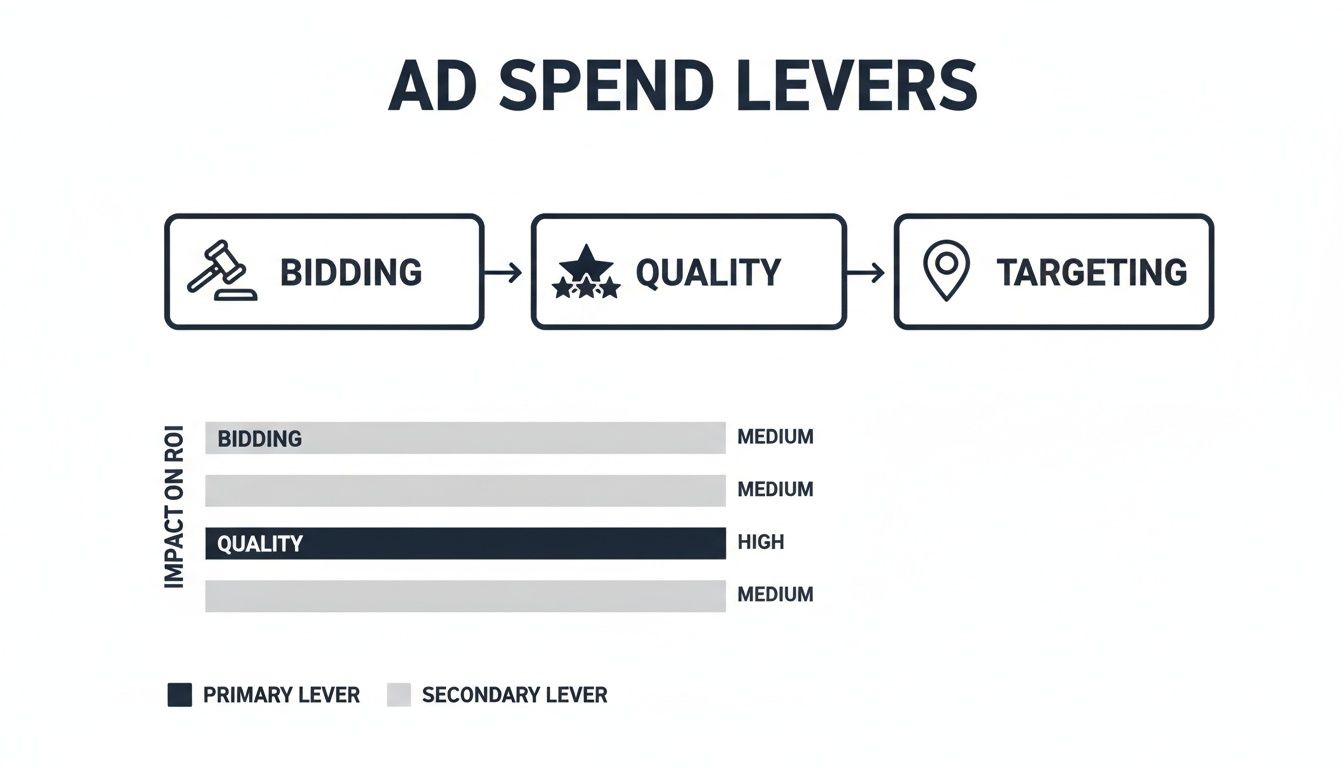
As the diagram shows, while you directly control your bids and targeting, it's your Quality Score that often has the biggest impact on your real-world costs and, crucially, your return on investment.
So, let's dive into some typical CPCs you might see across different UK sectors. This table gives you a rough guide for benchmarking your own Google Ads performance.
Average Cost-Per-Click (CPC) Across Key UK Industries
| Industry | Average CPC (Search Network) | Average CPC (Display Network) | Key Considerations |
|---|---|---|---|
| Legal | £6.00+ | £0.50 – £0.70 | Extremely high-value clients and fierce competition for specific legal terms drive up search costs. |
| Finance & Insurance | £3.50 – £5.50 | £0.45 – £0.65 | High LTV from products like mortgages and insurance policies means businesses will bid aggressively. |
| B2B Services | £3.00 – £4.00 | £0.40 – £0.60 | Business clients often have larger budgets and longer-term value, justifying higher click costs. |
| Self-Storage | £1.50 – £3.00 | £0.35 – £0.55 | Moderate competition with strong local intent. LTV is lower than legal or finance but still significant. |
| E-commerce/Retail | £1.00 – £2.00 | £0.25 – £0.45 | A huge range of product values and margins leads to more moderate, but highly variable, average CPCs. |
| Travel & Hospitality | £1.00 – £1.75 | £0.20 – £0.40 | High volume of searches but often tight margins per booking keeps bids competitive but on the lower end. |
These figures give you a solid starting point for what to expect. What matters most is using this information to ask the right questions about your own campaigns.
Data shows just how much these costs can fluctuate. For instance, recent figures revealed the UK insurance sector had the highest average CPC at £5.74 (equivalent to 7.24 U.S. dollars), a clear indicator of just how competitive high-value industries can get.
The Bottom Line: Never judge your campaign's costs in a vacuum. Use these benchmarks to understand your competitive landscape and to set a budget that reflects the economic reality of your sector.
Understanding these averages is the first step to properly calculating your potential return. A high CPC isn't necessarily a bad thing if it consistently leads to profitable new business. This is why it’s so critical to learn how to measure your marketing ROI accurately.
By tracking your performance against these industry figures, you can quickly spot whether your costs are in line with expectations or if there's an underlying issue with your Quality Score or targeting that needs your immediate attention.
How to Set a Realistic Google Ads Budget
Figuring out how ad auctions and industry averages translate into a real-world financial plan is where the rubber meets the road. Instead of asking, "What does it cost?", the better question is, "What should I invest to get the results I want?". This simple shift in thinking turns it from an expense into an investment tied directly to your business goals.
The good news is you don't need a degree in finance to build a smart, goal-driven Google Ads budget. It all starts with a straightforward calculation that works backwards from what you want to achieve.
Start with Your Business Goals
Before you even think about opening Google's Keyword Planner, you need a crystal-clear, measurable target. How many new customers are you aiming for each month?
Let's walk through this with a practical example. Imagine you run a local service business, and your goal is to land 20 new clients every single month from your website. That's our starting line. Now, let's work backwards to figure out how many clicks you'll need to hit that number.
Calculate How Many Clicks You Need
The next piece of the puzzle is your website's conversion rate. This is simply the percentage of visitors who do what you want them to—in this case, becoming a lead by filling out a form or picking up the phone.
Let's say your website converts at a solid 5%. This means for every 100 visitors, 5 turn into a lead. But you don't just need leads, you need clients. If your sales team is great at what they do and closes 50% of those leads, you'll need 40 leads to secure your 20 new clients.
Now we can do the maths to find out how many clicks we need:
(Number of Leads Needed / Website Conversion Rate) = Clicks Required
(40 Leads / 0.05) = 800 Clicks
There you have it. To hit your target, you need to drive 800 clicks to your website each month.
Estimate Your Monthly Budget
The final step is connecting those clicks to a cost. You’ll need to multiply the clicks you need by your estimated cost-per-click (CPC). You can get a good idea of this by looking at the industry benchmarks we discussed earlier or by dipping into Google’s Keyword Planner for your top search terms. Let's assume an average CPC for your industry is £2.50.
- Monthly Budget Formula: Clicks Required x Estimated CPC
- Your Estimated Budget: 800 Clicks x £2.50 = £2,000 per month
And just like that, you have a data-driven starting budget of £2,000 per month. It's not a number plucked from thin air; it's directly linked to your goal of winning 20 new clients. To make sure you don't overspend, you can set a daily budget cap in your Google Ads account (e.g., £2,000 / 30.4 days ≈ £65 per day), giving you total control.
This method gives you a fantastic starting point, but it's vital to treat your initial budget as a test. Your actual CPCs and conversion rates will fluctuate. Think of the first month or two as an information-gathering exercise, allowing you to collect real-world data and fine-tune your forecasts for much greater accuracy down the line. For businesses wanting to get this right from day one, professional PPC search advertising services can bring the expertise needed to build and optimise a campaign built for success.
Proven Strategies to Lower Your Google Ads Costs
Getting your Google Ads campaigns up and running is just the starting line. The real magic, and the path to profitability, lies in constant, intelligent optimisation. Reducing your Google paid search cost isn't about pulling back your budget; it’s about making every pound work smarter and harder for you.
Success in paid search is all about a continuous cycle of testing, learning, and refining your approach. The good news is, there are plenty of powerful tools and proven tactics you can use to systematically trim wasted spend and boost your return on investment. Let's dig into some of the most effective strategies you can start using today.
Master Your Keyword Targeting
A tightly managed keyword list is the bedrock of any cost-effective campaign. One of the fastest ways to drain your budget is paying for clicks from people who aren't actually looking for what you sell. This is where negative keywords become your secret weapon.
A negative keyword is simply a term you tell Google not to show your ad for. It’s your campaign’s bouncer, keeping the wrong crowd out.
- Why it works: It acts as an instant filter, preventing your ads from showing up for irrelevant searches that have zero chance of converting.
- How to do it: Make a habit of checking your "Search terms" report in Google Ads. Hunt for queries that are clearly a poor match for your business and add them as negatives. For instance, a self-storage business would likely want to add “-jobs” and “-free” to stop paying for clicks from job hunters or bargain seekers.
By blocking irrelevant traffic, you’re not just saving money. You’re also improving your click-through rate (CTR), which sends a positive signal to Google, helping to boost your Quality Score and lower your costs even further.
Relentlessly Improve Your Quality Score
As we’ve seen, your Quality Score is probably the most powerful lever you can pull to reduce your ad spend. A higher score directly translates into a lower cost-per-click—it's Google's way of rewarding you for a great user experience.
Improving it means focusing on two main areas:
- Write Compelling Ad Copy: Your ad text needs to be incredibly relevant to the keywords in its ad group. Weave your main keyword into the headline and description, and finish with a clear, strong call to action that tells people exactly what to do next.
- Optimise Your Landing Pages: The page a user lands on after clicking your ad must deliver on the ad's promise. It needs to load quickly, look great on mobile, and be directly related to what they searched for. If you want to turn more of those expensive clicks into actual customers, it’s well worth learning how to increase conversion rates on your site.
Use Smart Bidding and Targeting
Finally, you can make your budget go further by being clever about when and where your ads appear. It's surprisingly easy to waste money on clicks that come from outside your most profitable locations or times of day.
Ad Scheduling gives you control over the specific hours and days your campaigns are active. If your data shows that most of your leads come in during business hours, why spend money at 3 a.m.? Pause your ads during quiet periods and concentrate your budget when it matters most.
Similarly, Location Targeting lets you show ads only to people in specific cities, postcodes, or even within a certain radius of your business. For a local service like a self-storage facility, this is non-negotiable. It ensures you’re only paying to reach people who can actually use your service.
Answering Your Top Questions About Google Ads Costs
Even with a solid plan in place, it’s natural to have questions about the nuts and bolts of Google Ads costs. Getting straight answers helps you set a realistic budget and know exactly where your money is going. Let's dig into a couple of the most common questions we hear from UK business owners.
It’s the first thing everyone wants to know: what’s a normal price for a click? While it can swing wildly depending on your industry, we can look at some recent data to get a decent benchmark.
What's a Typical Cost Per Click in the UK?
You need a starting point. Research from 2025 shows that the average Cost Per Click for UK businesses is around £1.30. This gives you a rough idea of what to expect and shows that the UK market is pretty competitive compared to other major economies.
It’s a useful figure for initial budget planning. For a deeper dive into how this compares with other countries and industries, you can explore the full analysis of Google Ads costs on AgencyAnalytics.com.
Can I Put a Cap on My Spending?
Yes, absolutely. You are always in the driver's seat when it comes to your budget, so you’ll never get a surprise bill. Google Ads works by having you set an average daily budget for each of your campaigns.
Your actual spend might wobble a bit day by day—Google might spend a little more if it spots a good opportunity—but it all balances out. You will never be charged more than your daily budget multiplied by the average number of days in a month (30.4).
Think of it this way: You set the daily spending limit, and Google guarantees you'll never pay more than that daily limit x 30.4 over the course of a month. It’s a built-in safety net that keeps your finances predictable.
This system gives you complete peace of mind, letting you focus on your campaigns without worrying about costs running away from you. It makes your Google paid search spend a manageable and predictable part of your marketing budget.
Ready to take the guesswork out of your advertising? The team at Amax Marketing specialises in building cost-effective PPC campaigns that deliver real results for businesses like yours. Get in touch for a complimentary marketing audit today at https://amaxmarketing.co.uk.